
How to Install and Use the Nuelink Microsoft Edge Extension
The Nuelink Microsoft Edge Extension lets you create and share posts on all your linked social media accounts without opening a new tab or leaving your current page. It’s quick, easy, and designed for efficiency.
Content of this Guide:
How to Install the Nuelink Microsoft Edge Extension:
How to use the Nuelink extension:
Features of the Nuelink Extension
When to Use the Extension vs. the Main Dashboard
Nuelink Microsoft Edge Extension FAQs & Troubleshooting:
What is the Nuelink Extension?
The Nuelink Extension is a lightweight browser tool that integrates Nuelink's posting and scheduling capabilities directly into your browser. Instead of copying links, opening Nuelink in a new tab, and manually creating posts, you can now right-click on text, hover over images, or use the extension icon to create posts from anywhere on the web instantly.The extension is designed for creators, entrepreneurs, small business owners, and agencies who want to capture content opportunities in real-time and schedule them for later. It works seamlessly with your Nuelink account, so all posts created through the extension sync with your main Nuelink dashboard.How to Install the Nuelink Microsoft Edge Extension:
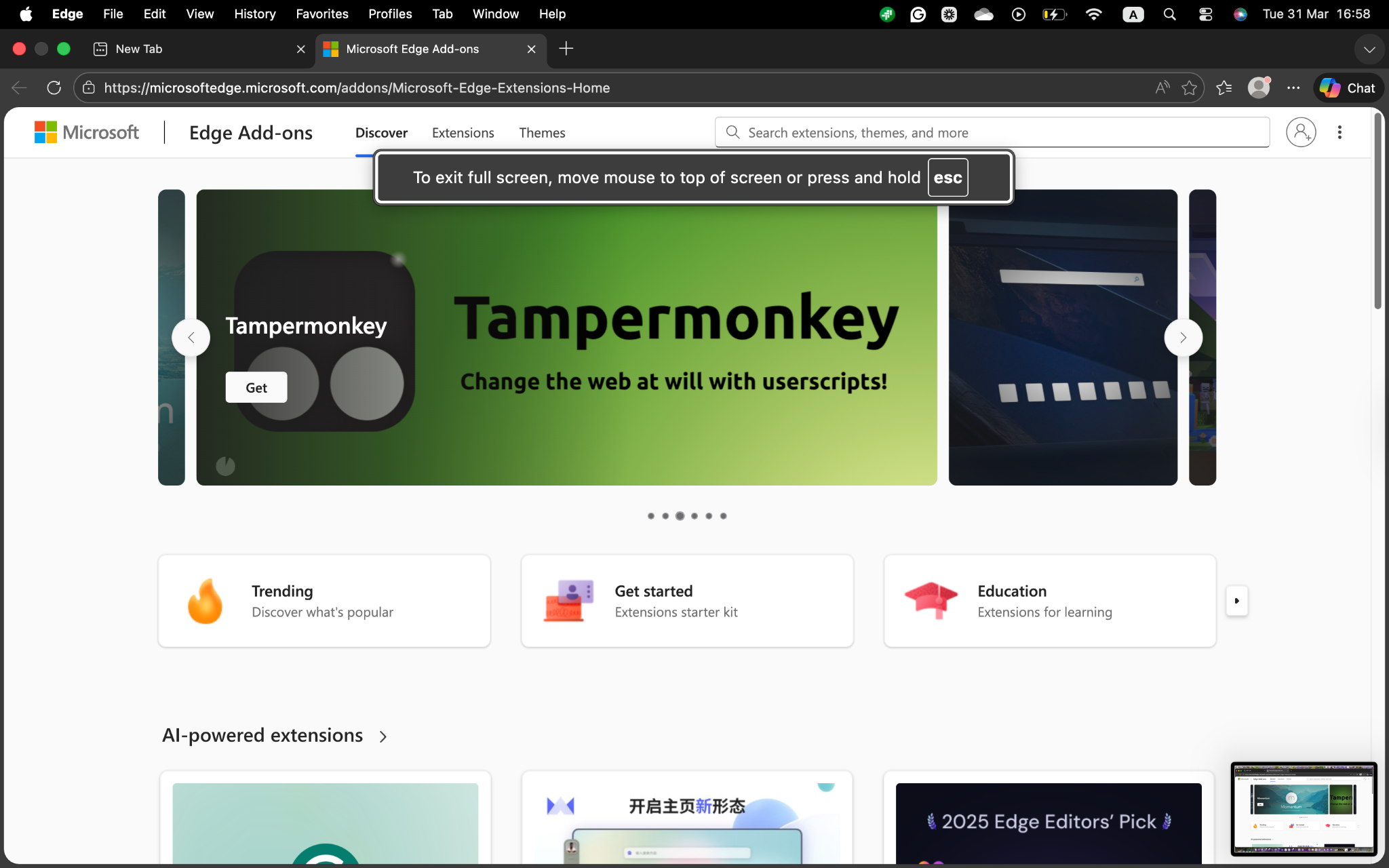
- To get the Nuelink Microsoft Edge extension, first go to the Microsoft Edge extensions:
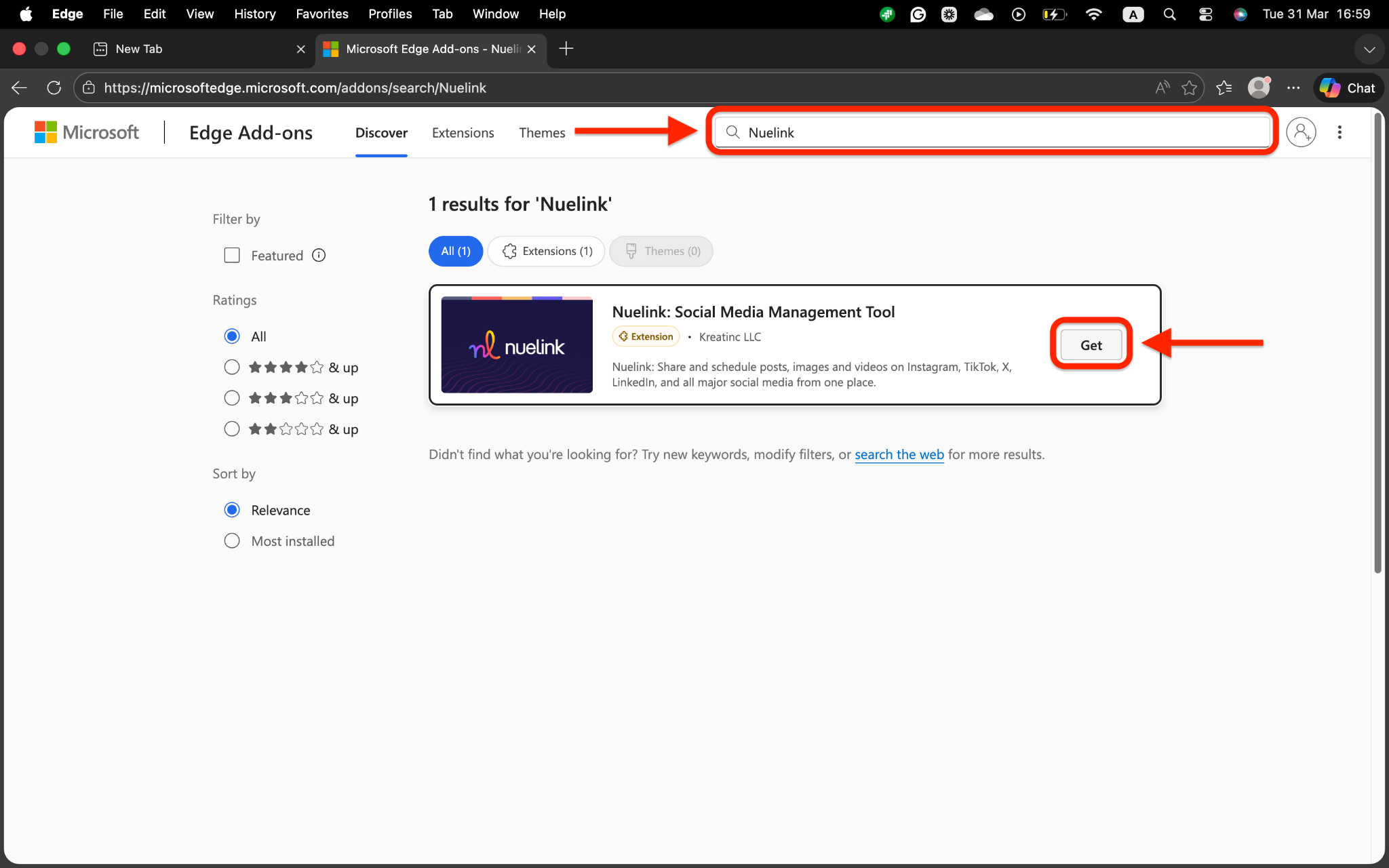
- Look up Nuelink in the search bar, hit Enter, and click on Get:
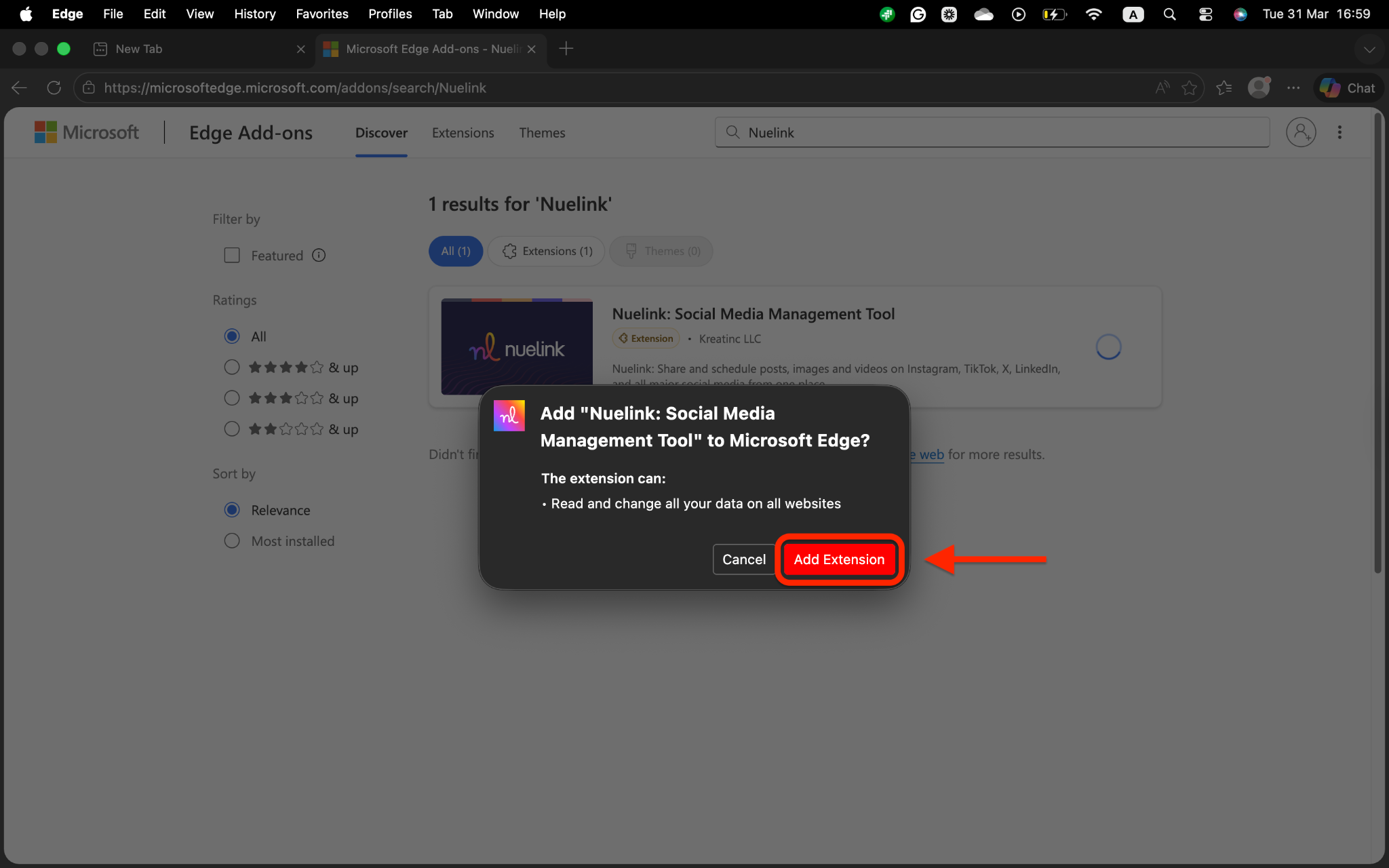
- Click on Add Extension:
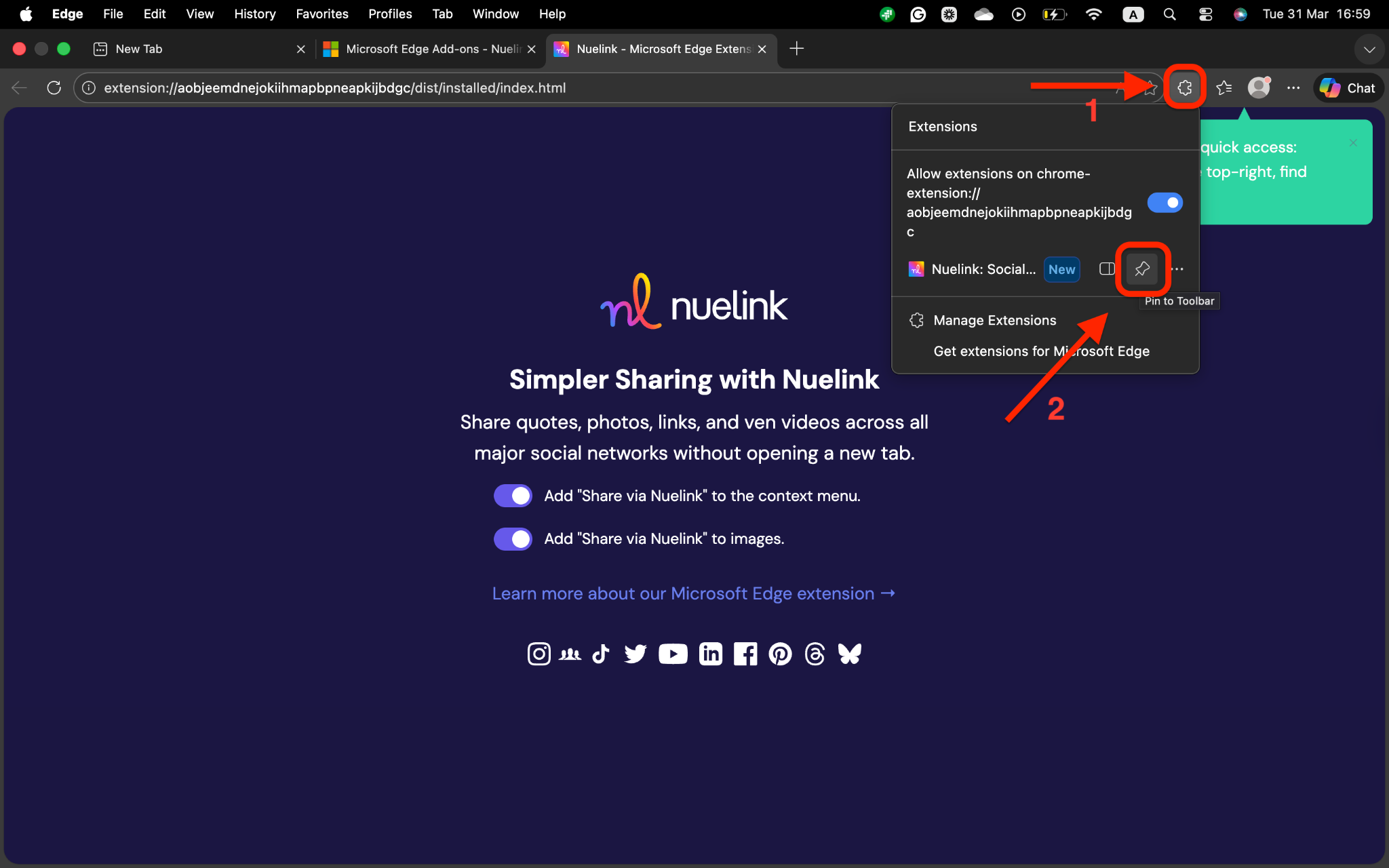
- Once installed, click on the puzzle at the top right, and pin Nuelink for quick access:
How to use the Nuelink extension:
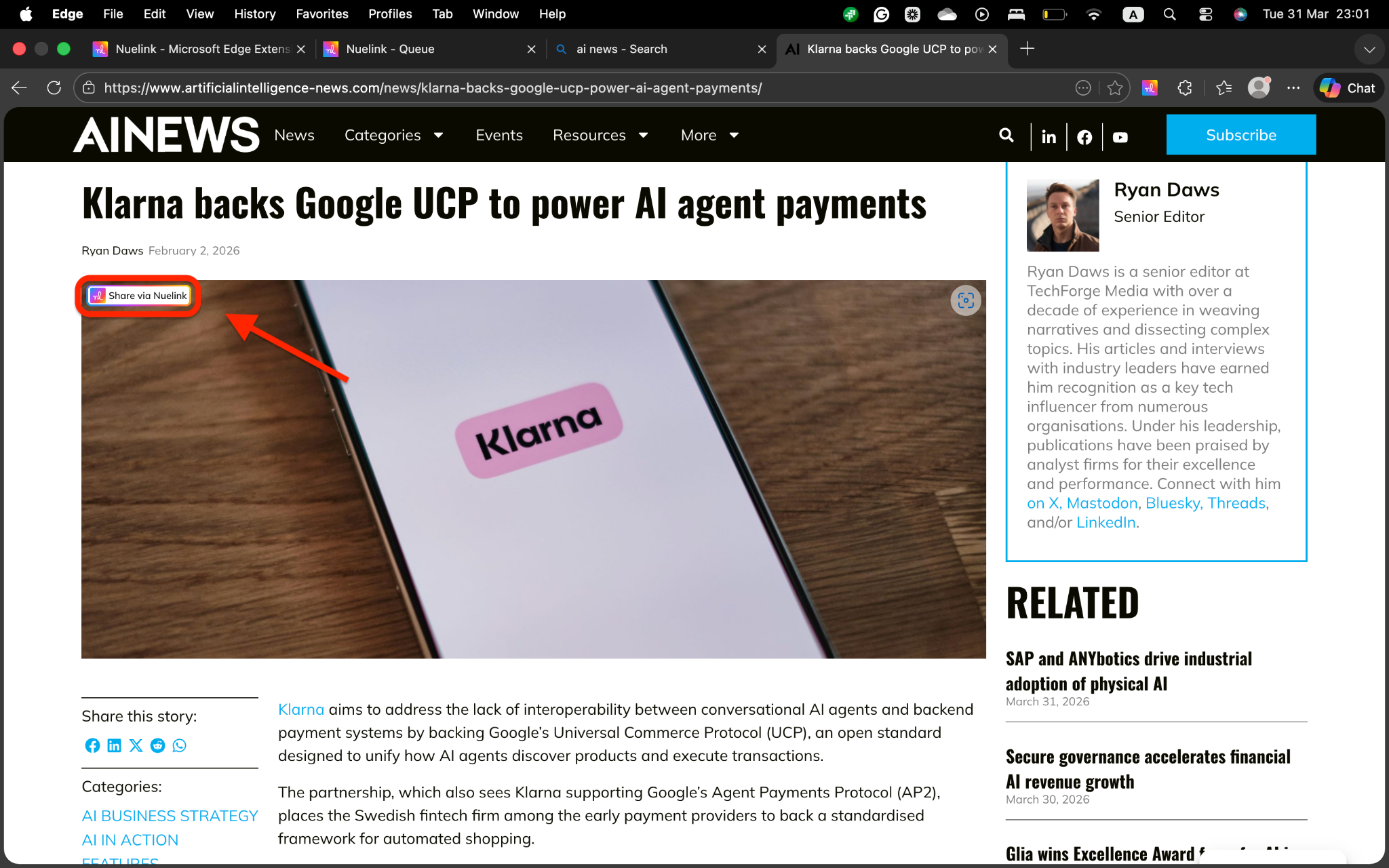
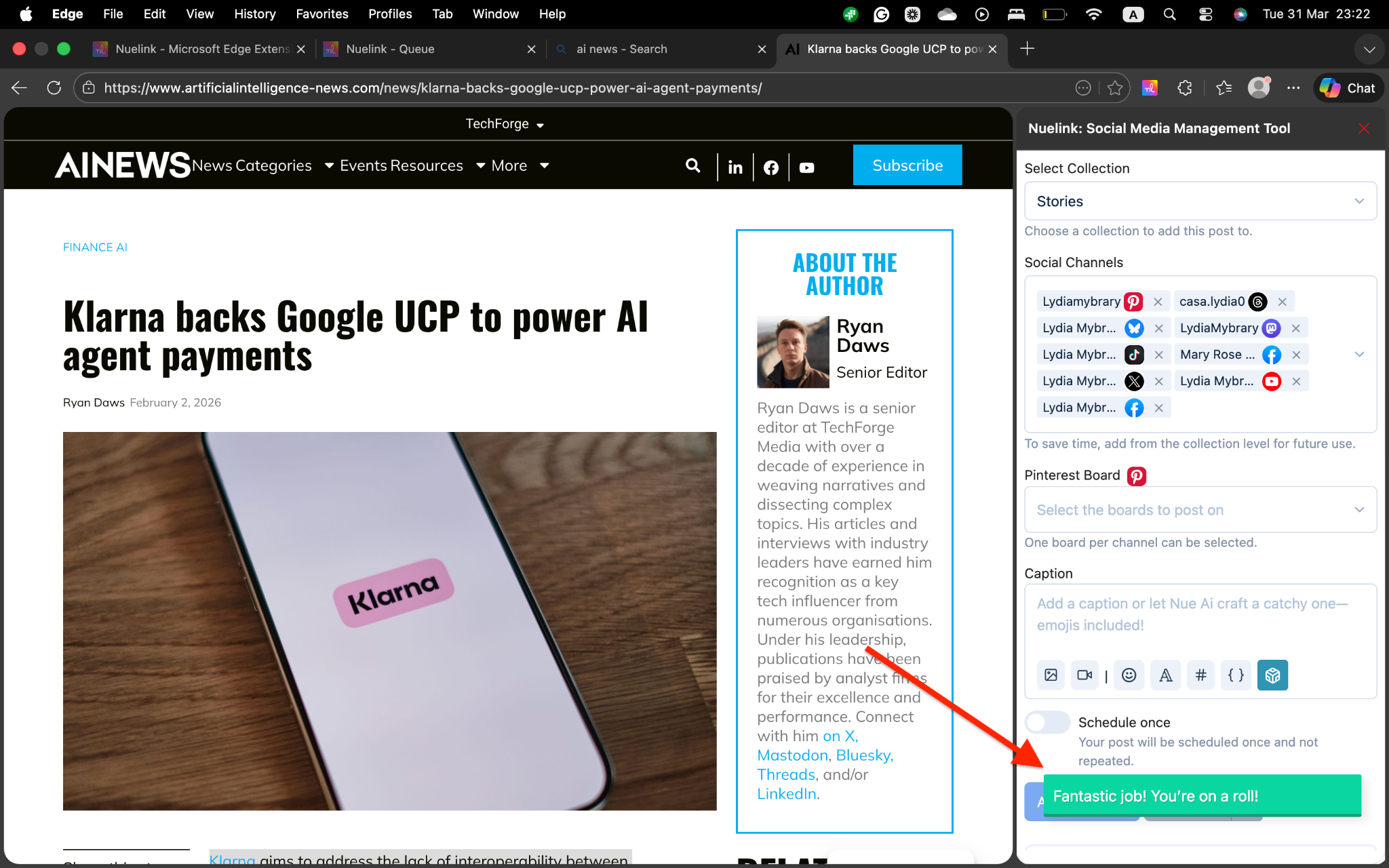
Once you are signed in, the extension is ready to use. You will see your brands listed in the extension, and you can switch between them at any time. Using the Nuelink extension allows you to create and publish posts quickly without needing to open a new tab. You can directly share images.- Click on Share on Nuelink on any image, or right-click to share on Nuelink:
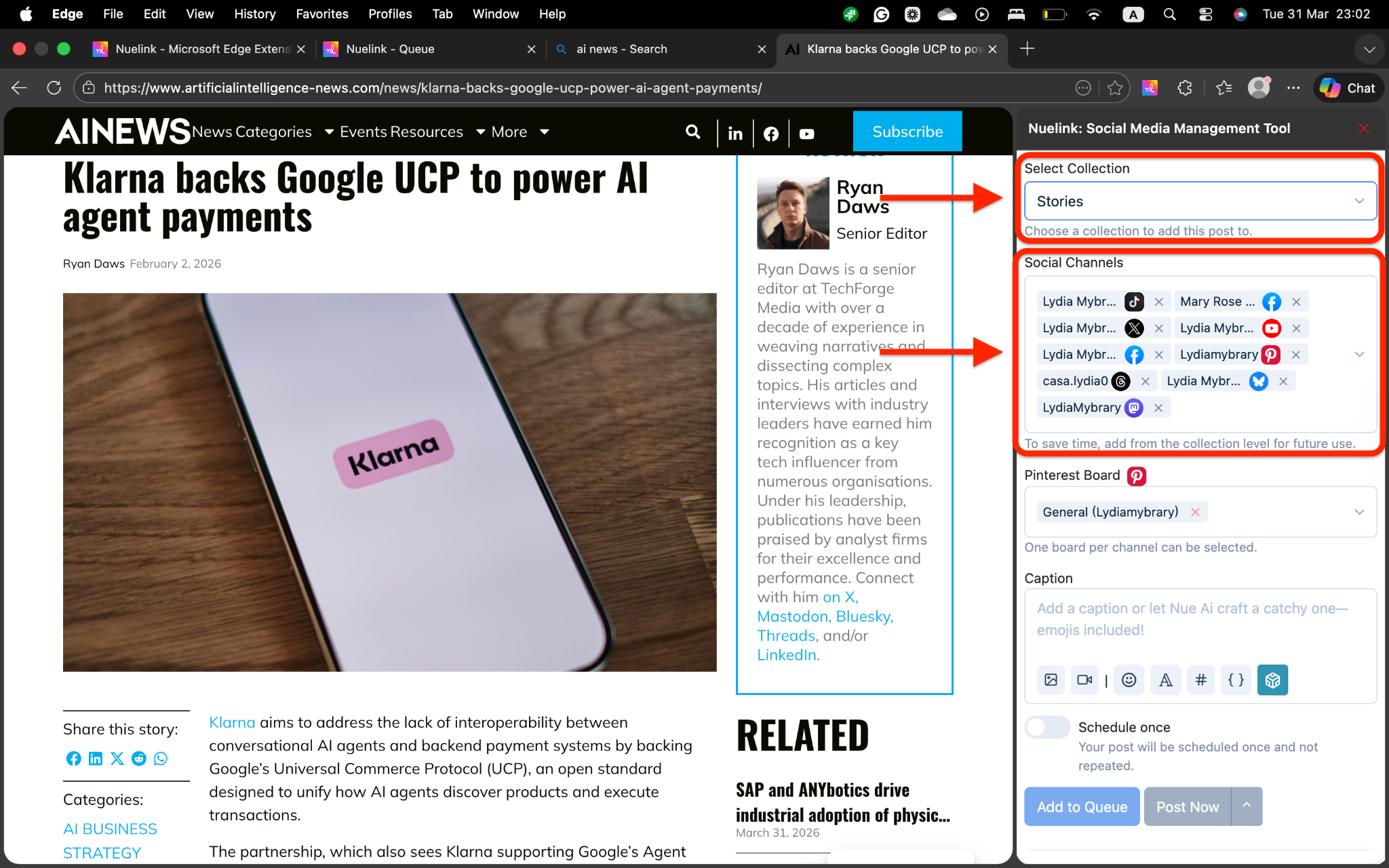
- Select your Collection and Social Channels:
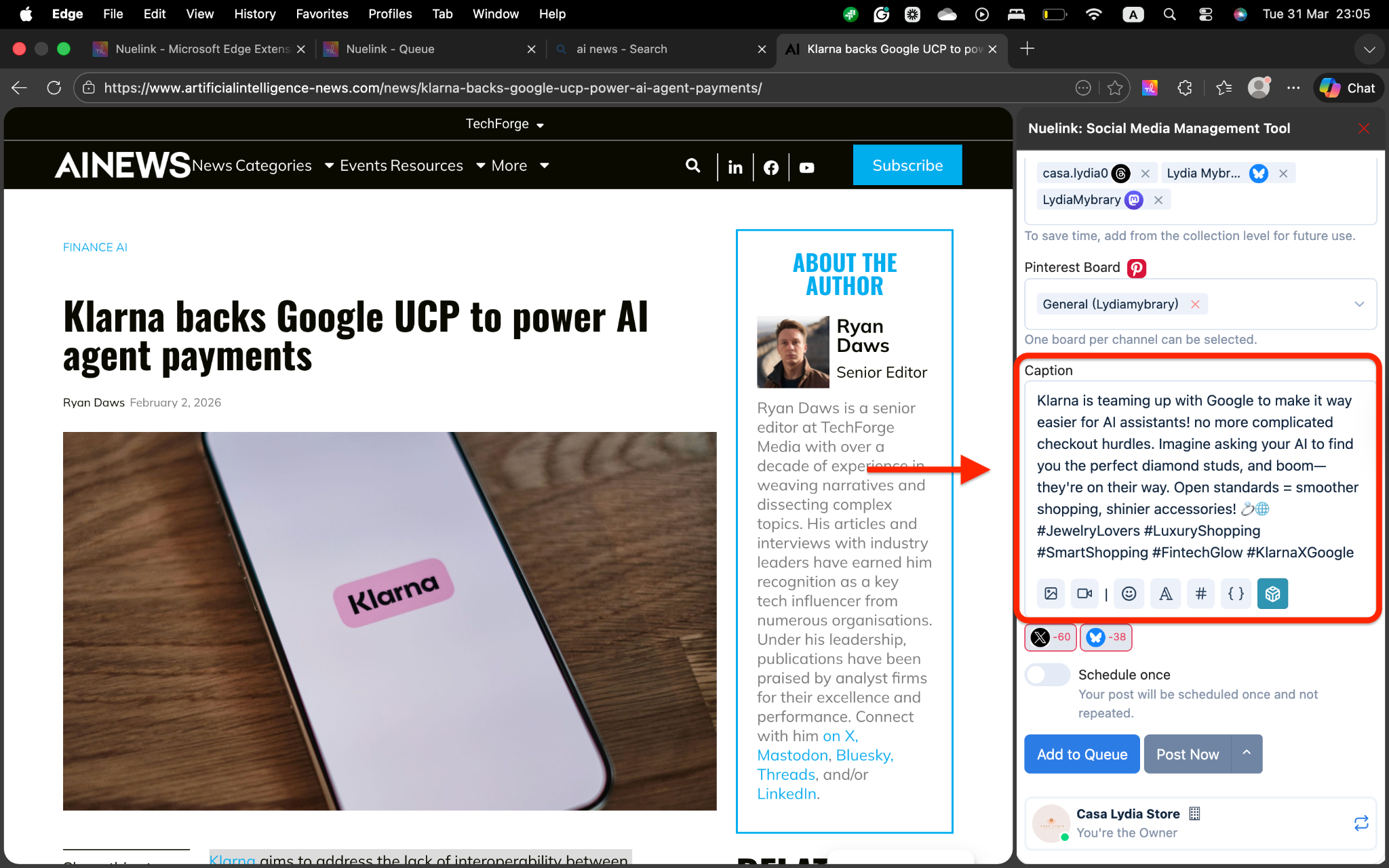
- Craft your post caption, and easily access NueAI, hashtag manager, font editor, and shortcodes to improve your caption:
- Directly schedule your post, post it directly, or have it saved to your drafts:
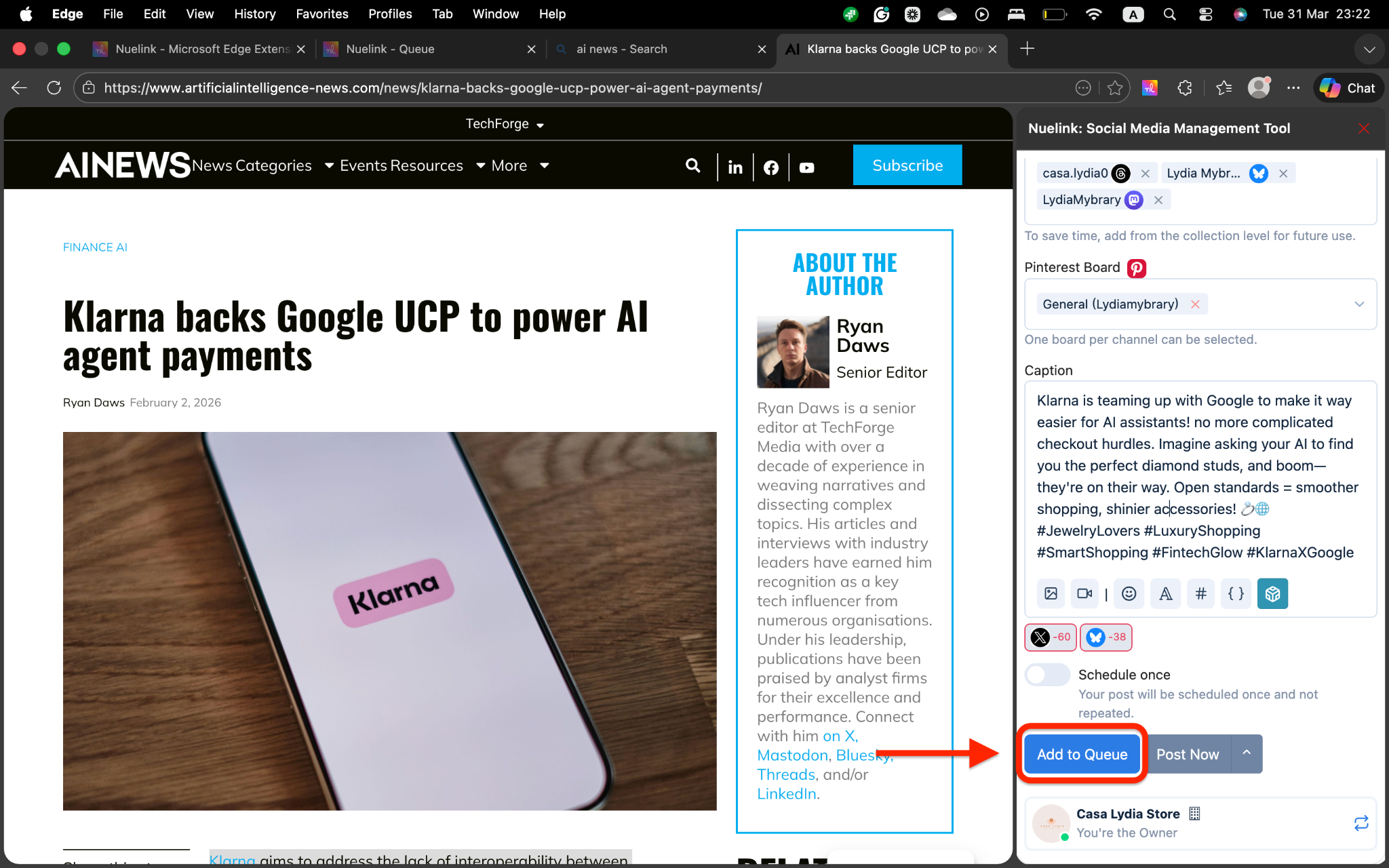
- That’s it. It will be directly posted, scheduled, or drafted based on your choice:
Features of the Nuelink Extension
The extension offers several powerful features designed to make social media sharing faster and more efficient.Simple Text and Link Sharing
One of the quickest ways to create a post is to share text or a link you find online. Simply select any text, link, or quote on a webpage, right-click, and choose "Share via Nuelink" from the context menu. The extension will open a posting window where you can add a caption, choose which brands and social channels to post to, and decide whether to publish immediately, schedule for later, or save as a draft.This feature is perfect for sharing industry news, customer testimonials, or any text-based content you want to amplify across your social channels.One-Click Image Sharing
Visual content is crucial for social media engagement. The extension makes it easy to share images you discover online. Simply hover over any image on a webpage, and you will see a "Share via Nuelink" button appear. Click it to open the posting window with the image already attached. You can then add a caption, select your target platforms, and schedule or publish the post.This feature saves you from having to download images and re-upload them to Nuelink. You can share images directly from news sites, blogs, competitor websites, or any other source.Multi-Format Content Creation
The extension supports creating and scheduling a variety of content formats, all directly from your browser. You can create text posts, image posts, carousels (multiple images), videos, and even short-form video content. This flexibility means you can handle most of your content creation needs without switching to the main Nuelink dashboard.Flexible Scheduling Options
When you create a post through the extension, you have full control over when and how it gets published. Your options include publishing instantly to send the post live immediately, scheduling for later by choosing a specific date and time, adding to the queue to have it published according to your brand's posting schedule, or saving as a draft to review or edit before publishing.This flexibility means you can capture content ideas whenever inspiration strikes, without worrying about the exact timing.AI-Powered Content Assistance
The Nuelink AI Assistant is built into the extension, helping you brainstorm ideas, rewrite content, and enhance your posts or threads. If you are stuck on how to caption an image or want to rephrase a post for better engagement, the AI can help. Simply click the AI Assistant button within the posting window and describe what you need help with.This feature is especially useful when you are creating multiple posts quickly or when you want to maintain a consistent tone across your content.Easy Brand Switching
If you manage multiple brands, businesses, or clients through Nuelink, the extension makes it simple to switch between them. You can toggle between your brands directly within the extension without logging out or navigating back to the main dashboard. This means you can quickly create posts for different brands without any friction.Permissions and Privacy
The Nuelink Extension requires certain permissions to function properly. These permissions allow the extension to read webpage content so you can select and share text, links, and images from any webpage, access your Nuelink account to authenticate you and sync your posts with your Nuelink dashboard, and interact with social media platforms to publish and schedule posts on your connected social channels.Nuelink takes privacy seriously. The extension does not sell your data to third parties and only uses your information for the core functionality of the extension. For more details, review Nuelink's privacy policy on the company website.When to Use the Extension vs. the Main Dashboard
The Nuelink Extension is perfect for quick, on-the-fly content creation and sharing. However, for more advanced features and detailed management, you will want to use the main Nuelink web app. Here is a quick comparison:| Feature | Extension | Main Dashboard |
|---|---|---|
| Quick text/link sharing | ✓ | ✓ |
| Image sharing | ✓ | ✓ |
| Multi-format content | ✓ | ✓ |
| Scheduling | ✓ | ✓ |
| Queue management | Limited | ✓ |
| Weekly posting schedule setup | ✗ | ✓ |
| Analytics and performance tracking | ✗ | ✓ |
| Comment management (Engage) | ✗ | ✓ |
| Automations (RSS, Shopify, etc.) | ✗ | ✓ |
| Bulk content creation | Limited | ✓ |
| Link-in-bio tools | ✗ | ✓ |
Nuelink Microsoft Edge Extension FAQs & Troubleshooting:
I can’t find the extension in my toolbar.
Click the puzzle icon in the top-right corner and pin the Nuelink extension by clicking the icon.
“Share via Nuelink” doesn’t show up when I right-click an image.
Make sure the extension is installed and enabled. Try refreshing the page or restarting Microsoft Edge.
Can I use NueAI inside the extension?
Yes! When crafting your caption, click the NueAI button to generate smart, relevant text instantly.
Can I switch between brands from the extension?
Of course, just scroll down to the bottom of the screen and switch between your brands.
Do I need a Nuelink account to use the extension?
Yes, a Nuelink account is required to use the extension. The extension is designed to work with your Nuelink account and sync all posts with your main dashboard. If you do not have an account yet, you can sign up for free at nuelink.com.Can I use the extension on other browsers besides this?
Currently, the Nuelink extension is available for Google Chrome, Edge, and Firefox. We are always exploring support for other browsers, so check back for updates.What social media platforms does the extension support?
The extension allows you to share and schedule posts on all major social media platforms that Nuelink supports, including Facebook, Instagram, TikTok, Twitter/X, LinkedIn, Pinterest, and more. The specific platforms available depend on which social channels you have connected to your Nuelink account.Can I schedule posts from the extension?
Yes, absolutely. The extension gives you full scheduling flexibility. You can schedule posts for a specific date and time, add them to your queue to be published according to your brand's posting schedule, or publish them instantly.Will posts created in the extension appear in my main Nuelink dashboard?
Yes. All posts created through the extension automatically sync with your main Nuelink dashboard. You can view, edit, or delete them from the dashboard if needed.Can I edit a post after I have created it in the extension?
You can edit posts created through the extension by accessing them in your main Nuelink dashboard. Once a post is published, you cannot edit it through the extension, but you can manage it through the dashboard.What happens if I sign out of the extension?
If you sign out of the extension, you will need to sign back in with your Nuelink credentials to use it again. Your posts and data remain safe in your Nuelink account.Can I use the extension on multiple devices?
Yes. As long as you are signed in with the same Nuelink account, you can use the extension on multiple devices. Your posts and account settings will sync across all devices.Does the extension work on private or incognito browsing?
The extension may have limited functionality in private or incognito mode, depending on your browser settings. For the best experience, use the extension in regular browsing mode.What permissions does the extension need, and why?
The extension needs permission to read webpage content so you can select and share text, links, and images. It also needs access to your Nuelink account to authenticate you and sync your posts. These permissions are necessary for the core functionality of the extension. Nuelink does not use these permissions for any other purpose.Is my data safe with the extension?
Yes. Nuelink takes data privacy and security seriously. The extension does not sell your data to third parties and only uses your information for the core functionality of sharing and scheduling posts. For detailed information about how your data is handled, review Nuelink's privacy policy.Can I use the extension to manage comments or engage with my audience?
The extension is focused on content creation and scheduling. For advanced features like comment management, engagement tracking, and audience insights, use the main Nuelink dashboard and the Engage feature.What should I do if the extension is not working properly?
First, try refreshing the webpage or restarting your browser. If the issue persists, sign out and sign back in to the extension. If you continue to experience problems, visit the Nuelink support center at help.nuelink.com or contact [email protected] for assistance.Can I use the extension to create bulk posts?
The extension is designed for quick, individual post creation. For bulk content creation and management, use the main Nuelink dashboard, which offers more advanced tools for creating multiple posts at once.How often is the extension updated?
Nuelink regularly updates the extension to add new features, improve performance, and fix bugs. Updates are typically installed automatically by the browser. You can check for updates manually by going to your browser's Settings > Extensions and enabling "Developer mode" to see the update options.Is there a cost to use the extension?
The extension is free to download and use, but it requires an active Nuelink account. Depending on your Nuelink plan, some features like the AI Assistant may require a paid subscription. Check your plan details in your Nuelink account for more information.Can I use the extension to share content on behalf of other people or brands?
Yes. If you manage multiple brands through Nuelink, you can easily switch between them in the extension and create posts for any of your brands. This makes it simple to manage content for clients or multiple business accounts from a single browser.Finally, if you happen to have any additional inquiries, please read through our Frequently Asked Questions section.
Check our Help Center for further tutorials. We offer several videos and articles on effectively getting the maximum benefit out of Nuelink.
Still need help? Contact Us.