
Best Pinterest Scheduling Tools in 2026
Here are some scary facts about Pinterest:
According to The Frank Agency, Pinterest has 498 million monthly active users, and Pinterest users save over 1.5 billion pins every week.
The one conclusion you need to take from this is that Pinterest is no longer a platform you can ignore for your business or personal brand.
However, you know for a fact that consistency is everything on Pinterest. But pinning manually every day is not realistic, especially if you're managing multiple accounts, handling Pinterest strategy for clients, or running Pinterest alongside other channels.
That's where Pinterest scheduling tools come in.
In this article, we cover the 5 best Pinterest scheduling tools in 2026, and we will look at features, pricing, and real use cases so you can pick the one that actually fits how you work.
But before we jump into the tools, let's make sure you know exactly what to look for in a Pinterest scheduling tool, so you can make the right call for your workflow.
What to Look for in a Pinterest Scheduling Tool
Not all Pinterest schedulers are built the same.
Here are the key things to check before you commit to one.
Number of Pinterest Accounts You Can Connect
This is the first thing to check, especially if you manage Pinterest for multiple clients or brands. Some tools only allow one Pinterest account on their entry-level plans, which means you'll hit a wall fast as you scale.
And some tools go even further with the restrictions; they won't let you connect more than one Pinterest account, regardless of your plan.
What you actually want is a tool that treats Pinterest accounts like any other social channel. So if your plan includes 7 social media channels, you should be able to connect all 7 of them as Pinterest accounts if that's what your strategy requires. Before you sign up, check exactly how many accounts are included in each plan and whether adding more comes at an extra cost.
How the Tool Handles Pinterest Boards
Pinterest is built around boards, so your scheduling tool needs to handle them properly.
At a minimum, it should let you select which board a pin goes to at the time of scheduling. But the best tools let you post the same pin to multiple boards in one go, saving you from duplicating work manually. If a tool makes board management clunky or limited, that's a red flag.
Support for Video Pins
Static images still work on Pinterest, but video pins are becoming one of the strongest formats on the platform.
A scheduling tool that only supports image uploads will limit your content strategy. Make sure the tool you pick supports video pins natively, so you're not forced to post those manually while everything else is scheduled.
Built-in Pinterest Analytics
You need to know which pins are driving impressions, clicks, and saves. You need that data without switching back and forth between your scheduler and Pinterest's native analytics. Look for a tool that gives you a clear performance overview directly inside the dashboard.
Bulk Scheduling
If you're serious about Pinterest, you're not scheduling one pin at a time. Bulk scheduling lets you upload and queue multiple pins in one session, which is essential for maintaining consistency without spending hours every week on it. This is a non-negotiable feature for anyone running Pinterest at scale.
Automatic Post Recycling
Pins don't expire the way posts do on other platforms; they can keep driving traffic months or even years after they were first published.
A recycling feature automatically re-queues your pins so they keep working for you without any manual effort. Make sure that the tool you pick offers a version of this feature.
Best Pinterest Scheduling Tools in 2026
1. Nuelink — Best Pinterest Scheduling Tool Overall
Nuelink is a social media management platform built for agencies, creators, and e-commerce brands who need to manage multiple accounts across multiple channels from one place. It supports 12 platforms, including Pinterest, Instagram, TikTok, Facebook, LinkedIn, and more.

Key Pinterest Features
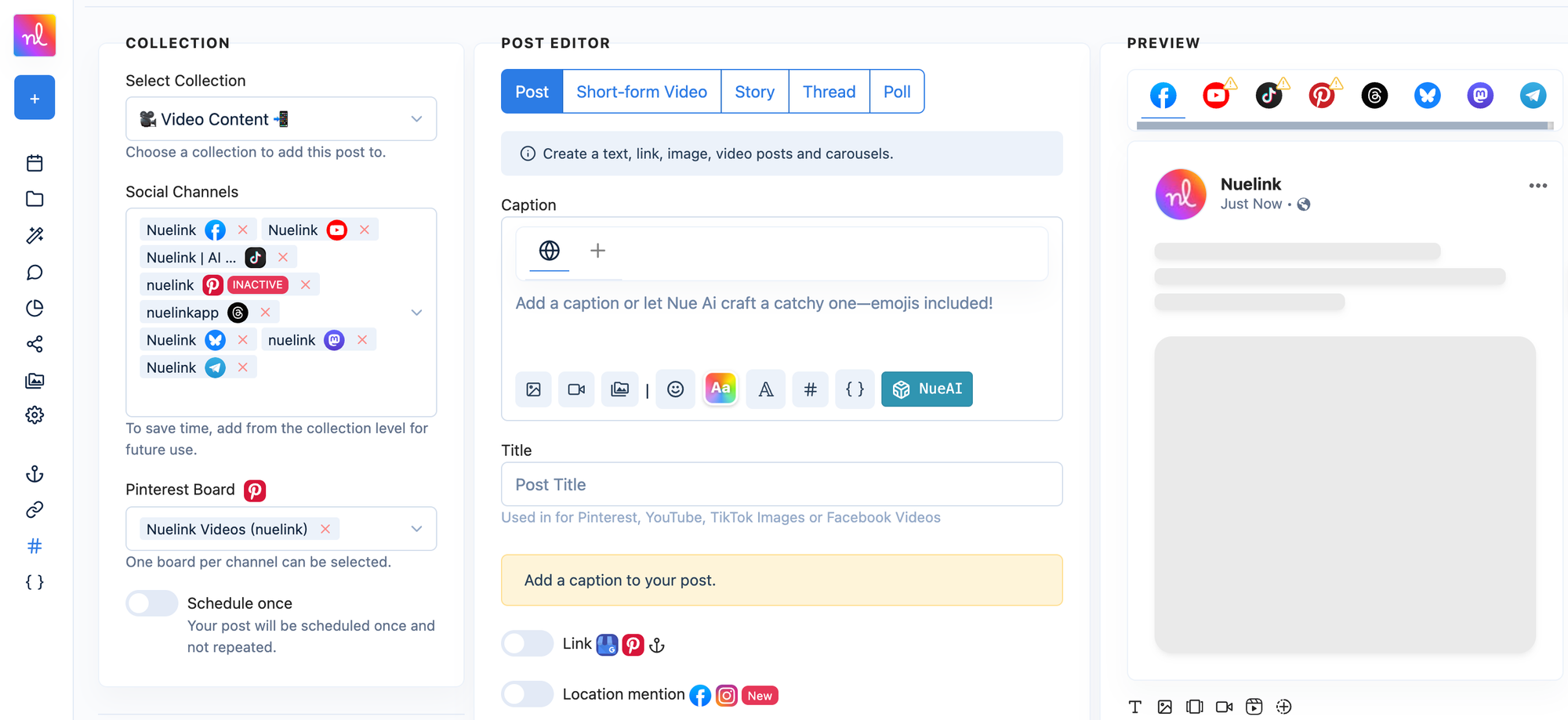
- Multiple Pinterest Accounts: Nuelink lets you connect as many Pinterest accounts as your channel limit allows, with no restrictions on account type. If your plan includes 10 social channels and you want all 10 to be Pinterest accounts, you can do that.
- Board Management: You can schedule pins to specific boards directly from the dashboard. Nuelink also lets you reuse top-performing content across multiple boards without manually rescheduling.
- Image, Video, and Multimedia Pins: Nuelink supports all pin formats — static images (JPEG and PNG), video pins (MP4 and MOV, up to 10 minutes), and multimedia pins with 2 to 5 images per post.
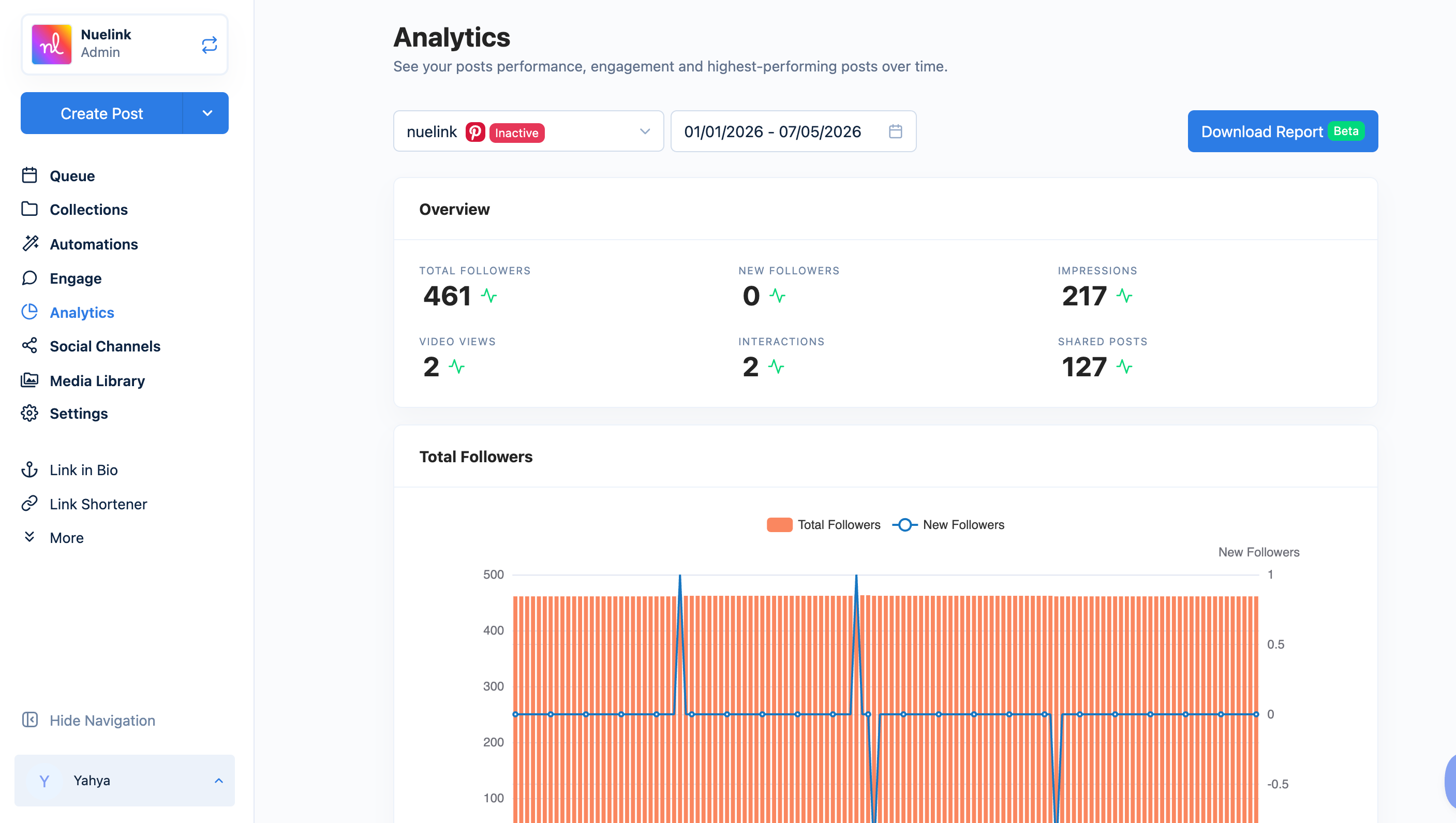
- Pinterest Analytics: Track impressions, engagement rate, clicks, saves, save rate, video views, and follower growth directly inside the Nuelink dashboard without switching to Pinterest native analytics.
- Bulk Scheduling via CSV: Prepare your pins in Google Sheets with image URLs, descriptions, boards, and posting times already set. Export as a CSV, upload to Nuelink, and your entire queue is scheduled instantly.
- Crossposting: Publish the same content to Pinterest and other platforms like Instagram, TikTok, and Facebook in one go. You can also tailor the content for each platform before publishing.
- AI Writing Assistant: Generate pin descriptions from a prompt or use it to rephrase, expand, or shorten an existing caption.
- Hashtag Manager: Save and organize your best-performing hashtags by topic or campaign and insert them into any pin while scheduling.
Pricing
| Plan | Price | Social Channels | Brands |
|---|---|---|---|
| Standard | $18/mo | 10 | 1 |
| Premium | $48/mo | 30 | 3 |
| Business | $78/mo | 60 | 6 |
All plans come with a 7-day free trial and a 30-day money-back guarantee.
2. Tailwind — Best Tool Built Specifically for Pinterest
Tailwind is a Pinterest-first marketing platform that has been Pinterest's longest-standing developer partner since 2012. Beyond scheduling, it includes keyword research, AI-powered pin creation, and a community feature.

Key Pinterest Features
- SmartSchedule: Tailwind automatically builds a publishing calendar with optimized time slots based on when your audience is most active.
- Keyword Research: Tailwind's keyword tool combines Pinterest type-ahead suggestions, Trends data, and audience signals into a single Resonance Score, so you can compare keywords and find what actually has potential in your niche.
- Turbo (Community Acceleration): Tailwind connects your top-performing pins with a community of professional Pinterest creators who engage with your content.
- Image and Video Support: Tailwind supports both photo and video pin scheduling across all paid plans.
Pricing
| Plan | Price (Annual) | Pinterest Accounts | Posts/mo |
|---|---|---|---|
| Free Forever | $0 | 1 | 5 |
| Pro | $17.99/mo | 1 | 150 |
| Advanced | $29.99/mo | 2 | 300 |
| Max | $49.99/mo | 3 | Unlimited |
3. Later — Best for Visual Content Planning
Later is a social media scheduling platform with a strong focus on visual content planning. It is an official Pinterest Marketing Partner with exclusive API access, which means it supports features like video pin scheduling that not all tools can offer.

Key Pinterest Features
- Automatic Pin Scheduling: Later lets you plan and schedule both photo and video pins in advance with full automatic publishing. No manual posting required.
- Visual Content Calendar: Plan your Pinterest content using a weekly or monthly calendar view. You can drag and drop pins into time slots and see when your audience is most active to post at the right time.
- Video Pin Support: As an official Pinterest Marketing Partner, Later has exclusive API access that enables video pin scheduling, which is not available on all third-party tools.
- Multi-Platform Scheduling: Schedule and publish the same content across Pinterest, Instagram, TikTok, Facebook, LinkedIn, Snapchat, and X from one place, with the ability to tailor each post per platform.
- Pinterest Analytics: Track traffic, clicks, and follower growth directly inside Later. Shorten links and see which pins are driving the most traffic to your site.
- Content Creation Tools: Crop, edit, and customize your photos and videos for Pinterest inside the app without needing a separate design tool.
- Mobile and Desktop Posting: Create and schedule pins from your phone or desktop, giving you flexibility to manage Pinterest on the go.
Pricing
| Plan | Price (Annual) | Social Sets | Posts/Profile/mo |
|---|---|---|---|
| Starter | $18.75/mo | 1 (8 profiles) | 30 |
| Growth | $37.50/mo | 2 (16 profiles) | 180 |
| Scale | $82.50/mo | 6 (48 profiles) | Unlimited |
All plans include a 14-day free trial.
4. Hootsuite — Best for Large Teams and Enterprises
Hootsuite is one of the most established social media management platforms on the market, built for teams that need to manage multiple social channels, collaborate on content, and report on performance at scale.

Key Pinterest Features
- Multi-Account and Multi-Board Scheduling: Hootsuite lets you create, schedule, and publish pins to several Pinterest accounts or boards at once directly from the dashboard.
- Content Calendar: See all your Pinterest pins alongside your other social content in a unified calendar view. You can drag and drop to fill gaps in your schedule.
- Board Management: Upload directly from your pre-approved media library, set up approval workflows to keep pins on brand, and create secret boards to protect your content strategy.
- OwlyWriter AI: Hootsuite's built-in AI assistant helps you generate fresh pin ideas and write captions directly inside the platform
5. Buffer — Best for Simplicity and Budget-Conscious Users
Buffer is a straightforward social media scheduling tool built for small businesses, creators, and solo marketers who want a clean way to plan and publish content.

Key Pinterest Features
- Photo and Video Pin Scheduling: Buffer supports scheduling both photo and video pins. You can choose your board, add a title, description, and destination link.
- Content Planning and Organization: Save and organize your pin ideas inside Buffer's Create space using boards and color-coded tags.
- Pinterest Analytics: Track saves, impressions, and engagement rate directly inside Buffer. On paid plans, you get advanced analytics.
- Visual Content Calendar: Plan and manage your Pinterest schedule using a weekly or monthly calendar view, accessible from both desktop and mobile.
Pricing
| Plan | Price | Channels | Users |
|---|---|---|---|
| Free | $0 | 3 | 1 |
| Essentials | $5/mo per channel | Flexible | 1 |
| Team | $10/mo per channel | Flexible | Unlimited |
Buffer's pricing scales per channel, so the more accounts you manage, the more you pay.
Why Nuelink is the Best Pinterest Scheduling Tool
Nuelink covers every feature you need to run a serious Pinterest strategy, all from one dashboard.
Multiple Pinterest Accounts
Most tools cap you at one Pinterest account on lower plans, and some won't let you connect more than one, regardless of what you pay.
Nuelink works differently. Your Pinterest accounts count as regular social channels, so if your plan includes 10 channels and you want all 10 to be Pinterest accounts, you can do that.
Board Management
Nuelink gives you full control over your boards from one place. When scheduling a pin, you choose exactly which board it goes to. You can also reuse top-performing pins across multiple boards without having to reschedule them manually, which saves a significant amount of time if you are running several boards across different themes or campaigns.
Image, Video, and Multimedia Pins
Nuelink supports every Pinterest pin format. You can schedule static image pins in JPEG or PNG, video pins in MP4 or MOV (up to 10 minutes long), and multimedia pins with 2 to 5 images per post.
You are not limited to just images, which matters as video continues to grow on Pinterest.
Pinterest Analytics
Nuelink tracks all the metrics that matter for Pinterest directly inside the dashboard. You can monitor total followers and growth over time, impressions, engagement and engagement rate, clicks and click-through rate, saves and save rate, video views, and your total published post count. No need to jump between Nuelink and Pinterest native analytics to get a clear picture of what is working.
Bulk Scheduling via CSV
Nuelink's bulk scheduling tool lets you prepare your entire content queue in Google Sheets, including image URLs, pin descriptions, posting times, and target boards, then export it as a CSV and upload it to Nuelink. Your full queue is scheduled instantly with no manual work. You can upload up to 100 Pinterest pins per CSV.
Bulk Schedule Pinterest Pins with Nuelink
Crossposting
Most brands and creators are publishing across multiple platforms at the same time. Nuelink lets you crosspost your Pinterest content to Instagram, TikTok, Facebook, and other platforms by setting up one automated crossposting system. It's completely automated, but you still have the power to control what content to get cross-posted and whatnot.
Store Automations
Nuelink lets you connect your online store directly to Pinterest and automatically promote your products on Pinterest without any manual work. Whether you are selling on Shopify, WooCommerce, Etsy, or other platforms, Nuelink pulls your products and schedules them to Pinterest on autopilot. This is especially powerful for e-commerce brands that have large product catalogs and want a consistent Pinterest presence without having to create and schedule every pin by hand.
Automatically Post Etsy Products to Pinterest
AI Writing Assistant
Writing a unique description for every pin adds up fast. Nuelink's built-in AI writing assistant lets you generate a complete pin description from a simple prompt, or refine an existing one by rephrasing, expanding, or shortening it. It keeps your captions consistent and saves time across large content batches.
Hashtag Manager
Nuelink's Hashtag Manager lets you save and organize all your Pinterest hashtags in one place, grouped by topic, campaign, or board. When you are scheduling a pin, you can insert any saved hashtag set directly into your description without having to look them up or copy-paste them every time.
