
Best TikTok Scheduling Tools in 2026
With TikTok, you do not need a big budget, a large team, or years of brand building to reach millions of people. A single video from a brand-new account can go viral overnight. That is why creators, small businesses, and global brands are all fighting for the same feed.
The numbers back this up. TikTok has 1.9 billion monthly active users globally, and users spend an average of 52 minutes per day on the app
But there is one really scary statistic about TikTok: roughly 272 videos are posted every second. Yes, you read that right... 272 Videos EVERY SECOND!
This explains one thing: the brands and creators winning on TikTok in 2026 are not the ones posting occasionally when they find the time. They are the ones posting consistently every day and with a large number of posts.
That is exactly what a TikTok scheduling tool gives you.
In this article, we cover the 5 best TikTok scheduling tools in 2026, and we will look at features, pricing, and real use cases so you can pick the one that actually fits how you work.
What to Look for in a TikTok Scheduling Tool
Number of TikTok Accounts You Can Connect
If you manage TikTok for multiple brands or clients, this is the first thing to check.
Some tools only let you connect one TikTok account on their entry-level plans, which creates a problem the moment you try to scale. What you actually want is a tool that treats TikTok like any other social channel, so if your plan includes 10 channels, you should be able to connect all 10 as TikTok accounts if your workflow requires it. Before signing up, verify exactly how many TikTok accounts are included in each plan and whether adding more costs extra.
Does It Support Publishing/Scheduling or Just Reminders?
This is very important. Some schedulers can publish your TikTok videos directly at the scheduled time. Others only send you a notification reminding you to post manually inside the TikTok app.
If you want a fully hands-off scheduling workflow, you need to confirm that the tool supports true publishing for TikTok, not just reminders. It's unlikely that they will mention it in their landing pages or homepage, so make sure to contact the customer support and verify with them that they support TikTok publishing directly, not just a workaround.
Video Format and Length Support
TikTok supports videos up to 10 minutes long, and the platform also supports image carousels of up to 10 images per post. Make sure the scheduling tool you pick supports the full range of formats you plan to use.
Advanced Publishing Controls
TikTok has unique settings that other platforms do not have. A good scheduler should let you control privacy settings (public, friends-only, or private), enable or disable comments, duets, and stitches, set a custom thumbnail, and toggle the branded content disclosure setting for sponsored videos. If a tool does not support these options, you will need to go back into the TikTok app manually after every post to configure them.
Built-in TikTok Analytics
You need to know which videos are driving views, likes, followers, and engagement so you can double down on what works. Look for a tool that shows you TikTok performance data directly inside the dashboard, without having to switch to TikTok's native analytics every time.
Bulk Scheduling
If you are managing TikTok at any scale, you need to be able to batch your content and schedule multiple videos in one session. A tool without bulk scheduling forces you into a manual, one-by-one scheduling routine that adds up to hours of wasted time every week.
Best TikTok Scheduling Tools in 2026
1. Nuelink — Best TikTok Scheduling Tool Overall
Nuelink is a social media management platform built for agencies, creators, and businesses who need to manage multiple accounts across multiple channels from one place. It supports 12 platforms including TikTok, Instagram, Pinterest, Facebook, LinkedIn, and more.

Key TikTok Features
- Multiple TikTok Accounts: Nuelink lets you connect as many TikTok accounts as your channel limit allows with no restrictions on account type. If your plan includes 10 social channels and you want all 10 to be TikTok accounts, you can do that.
- Advanced Publishing Controls: Nuelink gives you full control over how your TikTok videos are published. You can set privacy to public, friends-only, or private, and enable or disable comments, duets, and stitches directly from the scheduler.
- Video and Image Carousel Support: Nuelink supports all TikTok content formats (up to 10 minutes and 500MB)
- TikTok Analytics: Track your TikTok performance directly inside the Nuelink dashboard. You can monitor total followers and growth over time, likes, number of videos posted during any selected period.
- Bulk Scheduling via CSV: Prepare your entire TikTok content queue in Google Sheets with video file names, captions, dates, and times, then export it as a CSV and upload it to Nuelink.
- AI Writing Assistant: Generate attention-grabbing TikTok captions from a simple prompt, or use Nuelink's AI to rephrase, shorten, or punch up an existing caption.
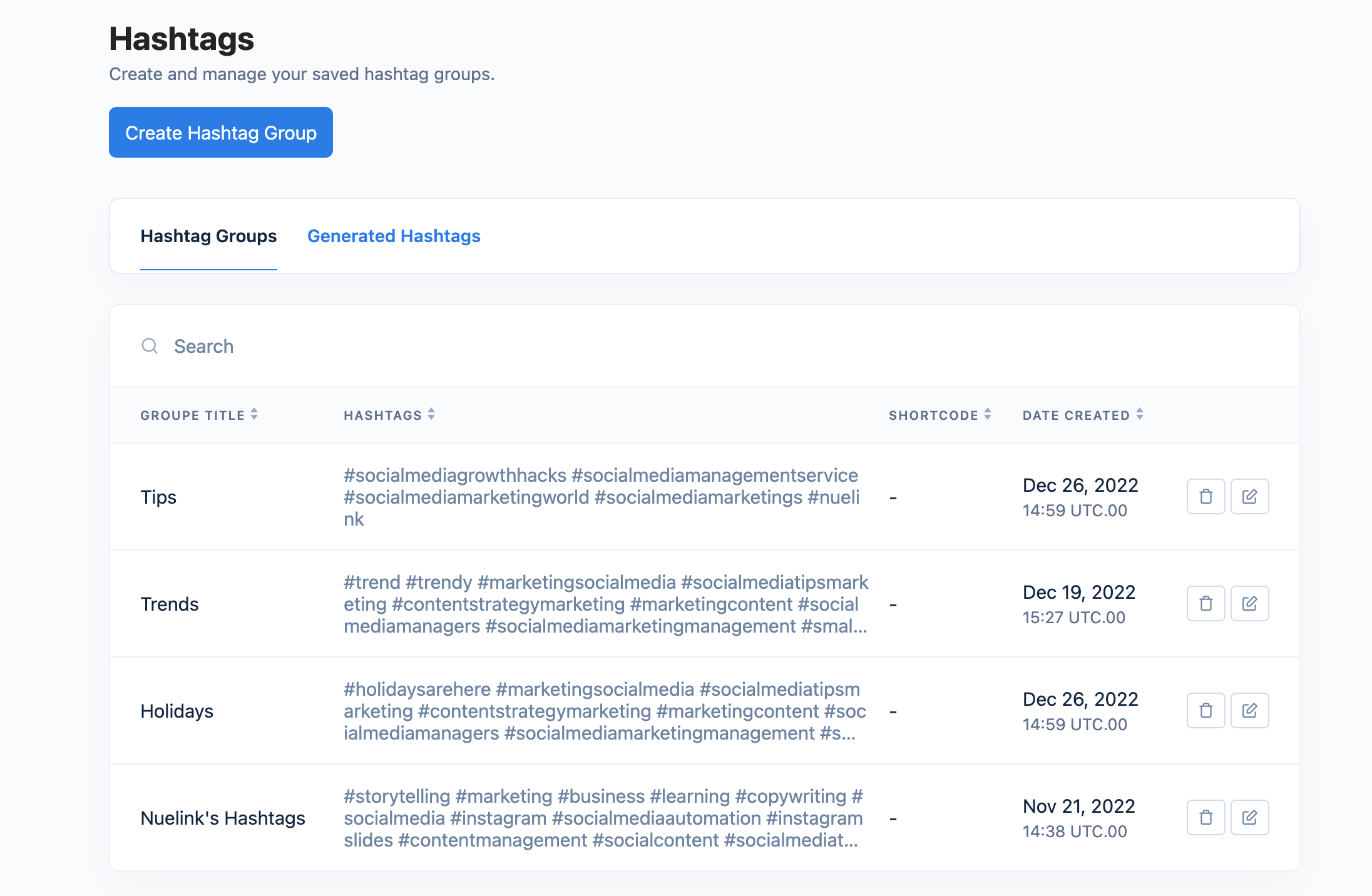
- Hashtag Manager: Save and organize your best TikTok hashtags by niche or campaign into reusable groups and insert them into any scheduled video with a single click.
Pricing
| Plan | Price | Social Channels | Brands |
|---|---|---|---|
| Standard | $18/mo | 10 | 1 |
| Premium | $48/mo | 30 | 3 |
| Business | $78/mo | 60 | 6 |
All plans come with a 7-day free trial and a 30-day money-back guarantee.
2. Hootsuite — Best for Large Teams and Enterprises
Hootsuite is one of the most established social media management platforms on the market, built for teams that need to manage multiple social channels, collaborate on content, and report on performance at scale. It is an official TikTok Marketing Partner.

Key TikTok Features
- TikTok Scheduling and Auto-Publishing: Hootsuite lets you schedule and publish TikTok videos directly from the dashboard at the best time for your audience.
- Best Time to Post: Hootsuite analyzes your audience activity and generates a heat map showing you exactly when your specific followers are most active on TikTok, so you can schedule at times that maximize your reach and engagement.
- TikTok Analytics: Track followers, views, engagement rate, shares, and more directly inside the Hootsuite dashboard. You can build customizable reports, benchmark your performance against competitors, and export results in PDF or PowerPoint format.
- Comment and DM Management: Manage TikTok comments and direct messages alongside all your other social channels from one unified inbox. No need to switch between tabs or devices to stay on top of engagement.
- Bulk Scheduling: On the Advanced plan, Hootsuite supports bulk scheduling of up to 350 posts at once via CSV upload, covering TikTok and all other connected channels.
- OwlyWriter AI: Hootsuite's built-in AI assistant helps you generate TikTok captions, content ideas, and scripts directly inside the platform. It also summarizes trending topics on TikTok in real time so you always know what to post next.
- Competitive Benchmarking: Compare your TikTok performance against competitors and get personalized recommendations on how to improve your content strategy relative to similar accounts in your niche.
Pricing
| Plan | Price (Annual) | Social Accounts |
|---|---|---|
| Standard | $99/user/mo | Up to 10 |
| Advanced | $249/user/mo | Unlimited |
| Enterprise | Custom | Unlimited |
3. Buffer — Best for Simplicity and Budget-Conscious Users
Buffer is a straightforward social media scheduling tool built for small businesses, creators, and solo marketers who want a clean, no-fuss way to plan and publish content. It supports TikTok alongside most major social platforms and is one of the most accessible tools on this list in terms of price and ease of use.

Key TikTok Features
- Video Scheduling: Schedule your TikTok videos in advance and set them to publish at the times your audience is most active. Buffer supports batch creation so you can prepare multiple videos at once and let them go out automatically throughout the week.
- Content Planning and Idea Management: Save and organize your TikTok video ideas inside Buffer's Create space using boards and color-coded tags.
- TikTok Analytics: Track views and engagement on individual TikTok posts inside Buffer. On paid plans you get advanced analytics including best time to post recommendations, audience demographics, and exportable reports.
- AI Assistant: Buffer's built-in AI helps you generate TikTok captions, repurpose existing content into new formats, and brainstorm video ideas without leaving the scheduler.
Pricing
| Plan | Price | Channels | Users |
|---|---|---|---|
| Free | $0 | 3 | 1 |
| Essentials | $5/mo per channel | Flexible | 1 |
| Team | $10/mo per channel | Flexible | Unlimited |
Buffer's pricing scales per channel.
4. SocialBee — Best for Content Recycling and Category-Based Scheduling
SocialBee is a social media management platform built around a unique content category system that lets you organize your posts by topic, content type, or campaign, and schedule them to publish in a rotating sequence. It supports TikTok alongside most major platforms and is particularly strong for evergreen content strategies and teams that need content approval workflows.

Key TikTok Features
- Custom Thumbnail: Choose an eye-catching frame from your video or upload a custom TikTok cover image to control exactly how your video appears on your profile before anyone clicks play.
- Evergreen Content Recycling: SocialBee's content recycling feature automatically re-queues your best performing or evergreen TikTok videos to be shared again after a set period. You can also set posts to expire after a certain number of shares or at a specific date, giving you full control over your content lifecycle.
- Content Categories: Organize your TikTok content into categories based on topic, campaign, or content type, and schedule them to post in an alternating sequence throughout the week. This keeps your feed varied and consistent without having to manually manage the order of every post.
- Best Time to Post Recommendations: SocialBee suggests optimal posting times based on your content categories and your top-performing historical content, helping you publish at the times most likely to drive engagement.
Pricing
| Plan | Price (Monthly) | Social Profiles | Users |
|---|---|---|---|
| Bootstrap | $29/mo | 5 | 1 |
| Accelerate | $49/mo | 10 | 1 |
| Pro | $99/mo | 25 | 3 |
All plans include a 14-day free trial and a 30-day money-back guarantee.
5. Later — Best for Visual Planning and Multi-Platform Scheduling
Later is a social media scheduling platform with a strong focus on visual content planning. It supports TikTok with full auto-publishing, comment moderation, analytics, and a customizable link-in-bio tool, all from one dashboard.

Key TikTok Features
- Best Time to Post: Later analyzes your audience activity and shows you the best times to post on TikTok directly in your calendar and post builder, based on when your specific followers are most engaged.
- Visual Content Calendar: Plan your TikTok content using a weekly or monthly drag-and-drop calendar view alongside all your other social platforms. See exactly how your posting schedule looks across the week and fill in gaps easily.
- Comment Moderation: Later's conversations feature lets you view, filter, reply to, like, hide, and delete TikTok comments directly inside the platform. You can manage your entire TikTok engagement without opening the app.
- Multi-Platform Scheduling: Schedule and publish the same content across TikTok, Instagram, Facebook, Pinterest, LinkedIn, YouTube, Snapchat, and Threads from one place, with the ability to tailor each post per platform.
Pricing
| Plan | Price (Annual) | Social Sets | Posts/Profile/mo |
|---|---|---|---|
| Starter | $18.75/mo | 1 (8 profiles) | 30 |
| Growth | $37.50/mo | 2 (16 profiles) | 180 |
| Scale | $82.50/mo | 6 (48 profiles) | Unlimited |
All plans include a 14-day free trial.
All five tools on this list are solid options depending on your needs and budget. But if you want the best balance of features, flexibility, and price, Nuelink is the clear choice.
Why Nuelink is the Best TikTok Scheduling Tool
Nuelink covers every feature you need to run a serious TikTok strategy, all from one dashboard.
Let's discover some in more detail:
Multiple TikTok Accounts
Nuelink counts each TikTok account as a regular social channel, so if your plan includes 10 channels and you want all 10 to be TikTok accounts, you can do that. No extra fees.
Advanced Publishing Controls
Nuelink gives you full control over every TikTok video before it goes live. Set privacy to public, friends-only, or private. Enable or disable comments, duets, and stitches. Upload a custom thumbnail. Toggle the branded content disclosure for sponsored posts. And choose between auto-publishing or receiving a notification to finish the post manually inside the TikTok app. All of this from the scheduler, without touching the TikTok app.

Video and Image Carousel Support
Nuelink supports every TikTok content format. Single videos in MP4 or MOV up to 10 minutes and 500MB, single images, and carousel posts with up to 10 images per post.
TikTok Analytics
Nuelink tracks the metrics that matter for TikTok directly inside the dashboard. Monitor total followers and growth over time, likes, number of videos published in any selected period, and shared post count. No need to jump between Nuelink and TikTok's native analytics to understand what is working.

Bulk Scheduling TikTok Videos via CSV
If you are managing TikTok at any real scale, scheduling one video at a time is not a viable workflow. Nuelink's bulk scheduling tool lets you prepare your entire content queue in Google Sheets with video file names, captions, dates, and times, export it as a CSV, and upload it to Nuelink. Your full queue is scheduled instantly with no manual work.
Bulk Schedule TikTok Videos with Nuelink
Store Automations
Nuelink lets you connect your online store directly to TikTok and automatically promote your products as videos or posts without any manual work. Whether you are selling on Shopify, WooCommerce, Etsy, or other platforms, Nuelink pulls your products and schedules them to TikTok on autopilot. This is especially powerful for e-commerce brands that want to stay consistent on TikTok without having to manually create and schedule a post for every single product in their catalog.
Automatically Post Etsy Products to TikTok
AI Writing Assistant
Writing a unique caption for every TikTok video adds up fast. Nuelink's built-in AI writing assistant lets you generate a complete caption from a simple prompt, or refine an existing one by rephrasing, shortening, or adding more punch to it.
Hashtag Manager
Nuelink's Hashtag Manager lets you save and organize all your TikTok hashtags in one place, grouped by niche, campaign, or a simple name. When you are scheduling a video, you can insert any saved hashtag group directly into your caption with a single click without having to look them up or copy-paste them every time.
Your TikTok strategy deserves better than manual posting.