
Best Bluesky Scheduling Tools [2026 Version]
Bluesky has gone from a small invite-only app to one of the fastest-growing social networks in recent years.
It now sits at over 40 million registered users.
But here is the part most people miss: Bluesky has no built-in scheduler.
As of 2026, the platform only supports real-time posting, there is no native way to write a post now and publish it later.
That is a real problem, because Bluesky rewards exactly the kind of consistency that manual posting makes impossible. The platform is built around conversation and community, closer to early Twitter.
The accounts winning on Bluesky are posting daily, jumping into replies, and showing up consistently, not posting once a week when they remember to.
That is where a Bluesky scheduling tool comes in.
In this article, we cover the best Bluesky scheduling tools in 2026. We look at features, pricing, and real use cases so you can pick the one that actually fits how you work.
But first, let's make sure you know exactly what to look for, because Bluesky is different enough from other platforms that the usual social media management tool checklist won't be accurate here.
What to Look for in a Bluesky Scheduling Tool
Here are 7 must-have criteria to help you pick the best social media management tool for managing your Bluesky account. This is the June 2026 edition, and if any changes to Bluesky's functionality affect this list, we'll make sure to update it.
Media Support: Images, Carousels, and Video
Static text still works on Bluesky, but you can't rely only on text anymore.
Bluesky supports up to 4 images per post in square aspect ratio, plus video with a custom cover image.
Make sure the tool you pick supports the full media range, so you are not forced to post videos or carousels manually while everything else is scheduled.
Native Thread and Auto-Threading Support
This is the most Bluesky-specific thing on the list. Bluesky's culture is conversational and thread-driven, so threads are the core of how content performs.
A good scheduler should publish a real connected thread in a single action. Watch out for tools that claim thread support but actually just fire off separate posts.
Follow-up and Reply Scheduling
A common Bluesky practice is to put your external link in the first reply rather than in the main post, keeping the top post clean and conversation-friendly. Many creators also drop a follow-up comment to add context or restart a conversation.
The problem is that doing this manually means going back to your post at exactly the right moment.
A tool that lets you schedule that follow-up reply automatically, with a delay you control, removes that headache entirely. Make sure to find one.
Built-in Bluesky Analytics
Bluesky's native analytics are thin, which makes in-dashboard reporting more valuable here than on more mature platforms. You want to see follower growth, engagement, and post performance without leaving your social media management tool.
Look for a tool that gives you a clear performance overview directly inside the dashboard.
Number of Bluesky Accounts You Can Connect
If you manage Bluesky for multiple brands or clients, check this carefully. Bluesky's handle-as-domain system means people often run a personal account, a brand account, and several client accounts at once.
Some tools cap you at one Bluesky account on lower plans. What you actually want is a tool that treats Bluesky like any other social channel, so if your plan includes 10 channels, you can connect all 10 as Bluesky accounts if your workflow requires it.
Before committing to any tool, verify how many accounts each plan includes and whether you can connect all of them as Bluesky accounts.
Bulk Scheduling
If you are serious about the platform, you are not scheduling one post at a time.
Bulk scheduling lets you upload and queue a full batch of posts in one session (Most bulk scheduling tools offer at least 50 posts per batch), which is what keeps you consistent without spending hours every week on it.
Crossposting Across Decentralized Networks
Bluesky users rarely use Bluesky alone; in most cases, they maintain presences on Mastodon, Threads, and X.
If you're one of them, make sure to find a scheduler that cross-posts across these networks, so you reach the whole decentralized audience from one place, instead of copying and pasting the same post 4 times on each platform.
Best Bluesky Scheduling Tools in 2026
1. Nuelink
Best Bluesky Scheduling Tool Overall
🏆 Best for: agencies, creators, and businesses managing multiple accounts
Nuelink is a social media management platform built for teams who need to manage multiple accounts across multiple channels from one place. It supports 12 platforms, including Bluesky, Instagram, TikTok, Pinterest, Facebook, LinkedIn, Threads, and Mastodon.

✨ Key Bluesky Features by Nuelink
- 👥 Multiple Bluesky Accounts: connect as many Bluesky accounts as your channel limit allows, with no restrictions. 10 channels can mean 10 Bluesky accounts.
- 🧵 Threads & Auto-Threading: publishes full connected threads in one action, so your reply chain stays intact instead of being faked with staggered posts.
- 💬 Follow-up Comments: schedule a follow-up reply automatically, with a delay you set. Perfect for the link-in-reply approach. No racing back to your post.
- 🖼️ Image, Carousel & Video: supports text posts, carousels with 1 to 4 square images, and video in MP4 or MOV with a custom cover image.
- 📊 Bluesky Analytics: track followers and growth, likes, and posts published in any period, right inside the dashboard.
- 📥 Bulk Scheduling via CSV: queue up to 100 Bluesky posts from a single spreadsheet.
- 🔁 Crossposting: crosspost between Bluesky, Threads, Mastodon, X, and LinkedIn through one automated system.
- 🤖 AI Writing Assistant: generate a complete caption from a prompt, or rephrase and shorten an existing one.
- #️⃣ Hashtag Manager: save and insert your best hashtag groups with a single click.
| 💰 Plan | Price | 📡 Channels | 🏢 Brands |
|---|---|---|---|
| Standard | $24/mo | 10 | 1 |
| Premium | $48/mo | 30 | 3 |
| Business | $78/mo | 60 | 6 |
✅ All plans include a 7-day free trial and a 30-day money-back guarantee.
🦋 See it in action: Schedule your first Bluesky post with Nuelink →
2. Buffer
Best for Simplicity & Budget-Conscious Users
💸 Best for: solo creators and small teams who want clean scheduling
Buffer is a straightforward scheduling tool built for small businesses, creators, and solo marketers. It added Bluesky support in late 2024 and is one of the most accessible tools on this list.

✨ Key Bluesky Features by Buffer
- 🧵 Native Thread Scheduling: schedule connected Bluesky threads, not just single posts.
- 🎬 Video & Image Scheduling: publish image and video posts at peak times.
- 🗂️ Content Planning: organize ideas in Buffer's Create space with boards and color-coded tags.
- 📈 Analytics: track views and engagement, with advanced analytics on paid plans.
- 🤖 AI Assistant: generate captions and repurpose content inside the scheduler.
| 💰 Plan | Price | 📡 Channels | 👤 Users |
|---|---|---|---|
| Free | $0 | 3 | 1 |
| Essentials | $5/mo per channel | Flexible | 1 |
| Team | $10/mo per channel | Flexible | Unlimited |
⚠️ Pricing scales per channel, so the more accounts you connect, the more you pay.
🐝 3. SocialBee
Best for Content Recycling & Category-Based Scheduling
♻️ Best for: evergreen content strategies and category-driven feeds

SocialBee is built around a content category system that lets you organize posts by topic, type, or campaign, then publish them in a rotating sequence. It supports Bluesky and is especially strong for evergreen content.
✨ Key Bluesky Features by SocialBee
- ♻️ Evergreen Recycling: automatically re-queue your best posts, with options to expire after a set number of shares or a specific date.
- 🗂️ Content Categories: schedule posts in an alternating sequence to keep your feed varied and consistent.
- 🔥 Best Time to Post: suggestions based on your categories and top-performing content.
- ✅ Approval Workflows: handy for teams that review content before publishing.
| 💰 Plan | Price (Monthly) | 📡 Profiles | 👤 Users |
|---|---|---|---|
| Bootstrap | $29/mo | 5 | 1 |
| Accelerate | $49/mo | 10 | 1 |
| Pro | $99/mo | 25 | 3 |
✅ All plans include a 14-day free trial and a 30-day money-back guarantee.
4. Fedica
Best Bluesky-Native Specialist
🛰️ Best for: users who want a tool built around decentralized and federated platforms

Fedica is one of the few platforms offering full publishing and analytics support for federated platforms like Bluesky, Mastodon, and Pixelfed, alongside the usual networks. If you want a tool built with decentralized platforms in mind, this is the specialist option.
✨ Key Bluesky Features by Fedica
- 🧵 Spreadable Thread Scheduling: native, connected Bluesky thread scheduling.
- 🎬 Bluesky Video Scheduling: schedule video content directly.
- 🔗 Auto Link Cards: automatically generate link cards on scheduled posts.
- 🚸 Content Warning Labels: apply Bluesky content labels right from the scheduler.
- 🔁 Crossposting: crosspost from Bluesky to X, Threads, and more.
- 📊 Deep Analytics: analytics-first, with audience and performance data across platforms.
| 💰 Plan | Price |
|---|---|
| Free | $0 (permanent) |
| Individual | ~$19–29/mo |
| Team | ~$149/mo |
⚠️ Pricing is reported inconsistently across sources. Confirm current figures on Fedica's official pricing page before publishing.
All 4 tools are solid options depending on your needs and budget. But if you want the best balance of features, flexibility, and price, Nuelink is the clear choice.
🦋 Start your 7-day free trial →
Why Nuelink Is the Best Bluesky Scheduling Tool
Nuelink covers every feature you need to run a serious Bluesky strategy, all from one dashboard. Let's look at some in more detail.
Multiple Bluesky Accounts
Most tools cap you at one Bluesky account on lower plans. Nuelink counts each Bluesky account as a regular social channel, so if your plan includes 10 channels and you want all 10 to be Bluesky accounts, you can do that. No extra fees. This is ideal for agencies and social media managers running personal, brand, and client handles side by side.
Threads, Auto-Threading, and Follow-up Comments
Bluesky runs on conversation, and Nuelink is built for it. You can publish full connected threads in a single action, so your reply chain stays intact. You can also schedule a follow-up comment to fire automatically after a delay you set, which is exactly what you need for the popular link-in-reply approach. Schedule the main post, schedule the reply with your link, and let Nuelink handle the timing while you focus on joining the conversation.

Image, Carousel, and Video Support
Nuelink supports every Bluesky content format. Schedule text posts, carousels with 1 to 4 square images, and video in MP4 or MOV with a custom cover image. You are never forced to post one format manually while scheduling the rest.
Bluesky Analytics
Nuelink tracks the metrics that matter for Bluesky directly inside the dashboard. Monitor total followers and growth over time, likes, and the number of posts published in any selected period, all in real time. No jumping between Nuelink and Bluesky to understand what is working.
Bulk Scheduling via CSV
If you are managing Bluesky at any real scale, scheduling one post at a time is not viable. Nuelink's bulk scheduling tool lets you prepare your entire queue in Google Sheets with captions, media, dates, and times, then export it as a CSV and upload it to Nuelink. Mix up to 100 Bluesky posts, including text and images, in a single file. You can also drag and drop media directly into the editor if you would rather skip spreadsheets.
Bulk Schedule Bluesky Posts with Nuelink
Crossposting Across the Decentralized Web
Most creators on Bluesky also maintain a presence on Threads, Mastodon, and X. Nuelink lets you crosspost your content across these platforms through one automated system, while still controlling exactly what gets crossposted and what does not.
Crosspost Bluesky Content with Nuelink
Store Automations
Nuelink lets you connect your online store directly to Bluesky and automatically promote your products without any manual work. Whether you sell on Shopify, WooCommerce, Etsy, or another platform, Nuelink pulls your products and schedules them to Bluesky on autopilot. This is especially powerful for e-commerce brands that want a consistent Bluesky presence without building every post by hand.
AI Writing Assistant
Writing a unique post for every update adds up fast. Nuelink's built-in AI writing assistant lets you generate a complete Bluesky caption from a simple prompt, or refine an existing one by rephrasing, shortening, or adding more punch.

Hashtag Manager
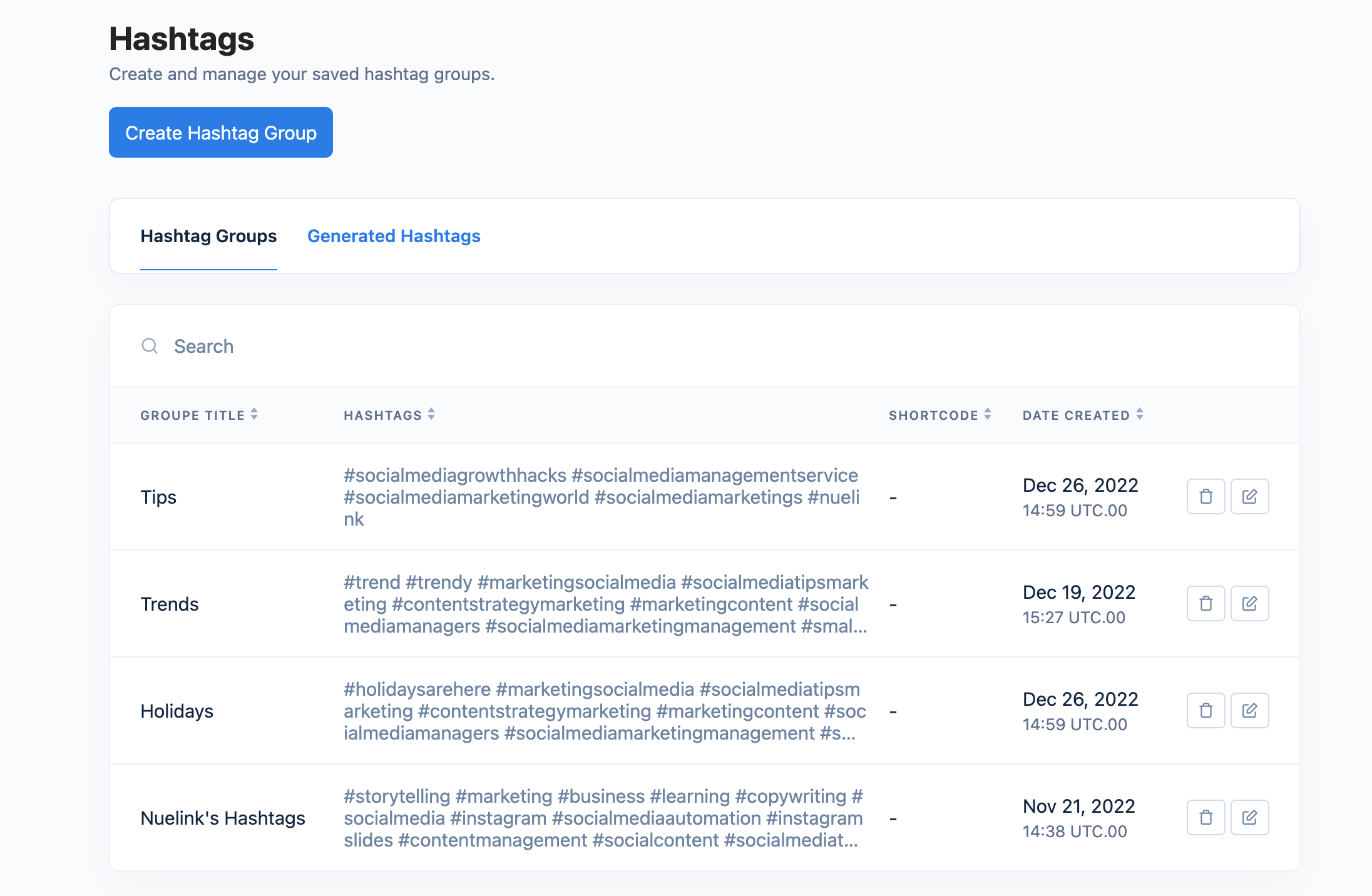
Nuelink's Hashtag Manager lets you save and organize all your Bluesky hashtags in one place, grouped by niche, campaign, or a simple name. When scheduling a post, insert any saved hashtag group into your caption with a single click, without looking them up or copy-pasting every time.
Your Bluesky strategy deserves better than manual posting 🦋 Try Nuelink free for 7 days.